[:1]I've created custom videos for use in a new map script by simply using a hex editor to replace the video in an original SFD. I am aware of legal issues with using certain software to encode SFDs but cannot determine if the Sofdec format itself is licensed in such a way that the distribution of SFDs is restricted.
Does anyone have any insight into the legalities of distibuting custom SFDs? Second, does GPG have any issues with me modifying one of the original movie files (none of the original video remains) to make custom movies and including them in a multiplayer campaign-type map?|||I thought domino had figured out how to make sounds & videos, so you should drop him a PM.
Also, if you're leaving nothing of the original movie in there, I don't see any problems GPG could have...
GreetZ ThaPear|||I have no issues making sounds and video... just wondering if GPG or CRI Middleware would have issues with me including SFDs (completely untouched by any tool other than a hex editor) with a map. Since my posting, CRI has responded to a query from a form on their website. Here's the bulk of the reply:
Quote:
Showing posts with label [:]. Show all posts
Showing posts with label [:]. Show all posts
Friday, April 13, 2012

Alternatives to Photoshop for heightmap editing
[:1]I'm interested in doing some map creation, but I don't have access to Photoshop. So I thought I'd start a list of alternative tools that may be useful for editing heightmaps. Please add to the list if you know of others, or let me know if I've listed something that you know doesn't work so I can remove it. I'll try to keep this up to date.
http://www.gimp.org/
I hear that it is a very well made editing program, and can do many things that photoshop can do.
Here is a interesting Fractal map generator that you dont have to download. Just mess with the settings and make an image. Copy that image and convert to grayscale and tweak it to get it to look right.
http://www.lysator.liu.se/~johol/fwmg/fwmg.html
Here is another terrain generator. Haven't tried it, but it looks alright.
http://hme.sourceforge.net/
And here is another version of a Terrain Generator
http://www.world-machine.com/download.html
Just use google and you can find dozens of programs to create those heightmaps.
By the way Poseidon88 that earth sculptor program looks pretty sweet. I will have to give that one a try.|||Nice work on finding editing utilities that can work with 16-bit grey. I had a heck of a time finding anything free. Bump for good info!|||Hm, what about Paint.Net?|||squidbot|||I tried the UT one (G16ED) but it seems to be limited to a size of 1024 x 1024.
Paint.net can't seem to open .raw files (unless i missed something).
Pixel seemed to have the option to open .raw, but gave an error when I tried.
Bear in mind though, I only tried to open a 4097x4097 heightmap (since thats what im working on).
Still trying to find something myself. I read that GIMP and paintshop are both supposed to work, but I cant get either to do it correctly. I haven't come across the option to set it to 16-bit or "IBM". |||Paint.net can't do 16-bit. From my research (about 4 months old) Gimp couldn't either. Not sure about Paintshop, but I was only looking at free tools.|||Correct, GIMP does not yet support 16-bit files. If you have a Linux box, though, you can try Cinepaint (formerly known as Film GIMP), which is a heavily modified version of GIMP that does support 16-bit editing. There's a new version (called Glasgow) in development that will run on Windows, but it's still in early alpha and is essentially non-functional.
Pixel is definitely buggy. I tried to mess around with it in 16-bit mode, but I couldn't seem to get any of the editing tools to work properly.
I'll try EarthSculpor next, but it looks like, despite using 16-bit files, it may only support a limited number of elevation levels.|||So far I've been starting with a blank map in the editor and using the stock brushes and painangels custom ones to do some really nice heightmap detailing.. You can get some amazingly good results from simply going back and forth between them to get the look you want for a paticular terrain..(undo FTW!) Painangles cut brushes are especially useful as they are so varied all you have to do to get a new look to a ravine or some uneven ground is to lightly apply a few to the same area until its perfect..
More brushes please.. |||Running into a few problems with Earth Sculptor, but so far I really like the feel of this app. If I can get it to import properly into the map editor I think I may have found my height map tool of choice.|||Lol, let us know how that works out. Editing with stock brushes is good and fine, but once you go above a 20x20 map its really tedious.|||Gimp doesnt work for me, I installed even a plug in, but it doesnt work at all...|||yeah I cant get the GIMP to work with the plugin's ive tried ):
just downloading the coral trial. But that only works for a month ):
WHY RAW FILES?!?!? whats wrong with a bitmap???|||I use:
Terragen
and
www.texturemaker.com (excellent software. buy now. very good to generate all sorts of maps, including all those for stratums, albedos, heightmaps, etc. - also has the "First Day Engine 2", which is a terrain visualization engine. Check out the texture blender, the textractor and gentex genetic texture generator... and the awesome particle system tools... argh... can you see I'm a fan? ) |||Thygrrr|||Just ask Google: 29,95 EUR in USD|||squidbot, could you maybe merge Thygrrr's cool list of tools and this one into one big sticky thread? Please?  |||Poseidon88|||I use http://www.freewarenetz.de/gimp.html
- EarthSculptor: can edit and save a 16-bit grayscale PNG file up to 4097x4097. Should be convertible to RAW format with ImageMagick (see below). Labeled as Beta. Untested.
- Pixel Image Editor: Can edit 16-bit grayscale images. Not sure what export formats are supported, but there should be something that can at least be converted to RAW. Still in beta and reportedly buggy. Untested.
- G16ed: Actually developed for editing UT4 heightmaps, but can supposedly import and export RAW format, and edit in 16-bit mode. Very limited editing tools, though. Untested. Side note: UnrealEd 3 includes a heightmap editor, so it may be possible to export from UnrealEd, then use this tool to convert to RAW format. No idea what image sizes are supported, though.
- ImageMagick: Not actually an editor, but can be used to convert between many different formats, including 16-bit grayscale. It is also possible to use this tool to interpolate 8-bit files up to 16-bit. See this thread for details: http://forums.gaspowered.com/viewtopic. ... map+editor[/url]
http://www.gimp.org/
I hear that it is a very well made editing program, and can do many things that photoshop can do.
Here is a interesting Fractal map generator that you dont have to download. Just mess with the settings and make an image. Copy that image and convert to grayscale and tweak it to get it to look right.
http://www.lysator.liu.se/~johol/fwmg/fwmg.html
Here is another terrain generator. Haven't tried it, but it looks alright.
http://hme.sourceforge.net/
And here is another version of a Terrain Generator
http://www.world-machine.com/download.html
Just use google and you can find dozens of programs to create those heightmaps.
By the way Poseidon88 that earth sculptor program looks pretty sweet. I will have to give that one a try.|||Nice work on finding editing utilities that can work with 16-bit grey. I had a heck of a time finding anything free. Bump for good info!|||Hm, what about Paint.Net?|||squidbot|||I tried the UT one (G16ED) but it seems to be limited to a size of 1024 x 1024.
Paint.net can't seem to open .raw files (unless i missed something).
Pixel seemed to have the option to open .raw, but gave an error when I tried.
Bear in mind though, I only tried to open a 4097x4097 heightmap (since thats what im working on).
Still trying to find something myself. I read that GIMP and paintshop are both supposed to work, but I cant get either to do it correctly. I haven't come across the option to set it to 16-bit or "IBM".
|||Paint.net can't do 16-bit. From my research (about 4 months old) Gimp couldn't either. Not sure about Paintshop, but I was only looking at free tools.|||Correct, GIMP does not yet support 16-bit files. If you have a Linux box, though, you can try Cinepaint (formerly known as Film GIMP), which is a heavily modified version of GIMP that does support 16-bit editing. There's a new version (called Glasgow) in development that will run on Windows, but it's still in early alpha and is essentially non-functional.Pixel is definitely buggy. I tried to mess around with it in 16-bit mode, but I couldn't seem to get any of the editing tools to work properly.
I'll try EarthSculpor next, but it looks like, despite using 16-bit files, it may only support a limited number of elevation levels.|||So far I've been starting with a blank map in the editor and using the stock brushes and painangels custom ones to do some really nice heightmap detailing.. You can get some amazingly good results from simply going back and forth between them to get the look you want for a paticular terrain..(undo FTW!) Painangles cut brushes are especially useful as they are so varied all you have to do to get a new look to a ravine or some uneven ground is to lightly apply a few to the same area until its perfect..
More brushes please..
|||Running into a few problems with Earth Sculptor, but so far I really like the feel of this app. If I can get it to import properly into the map editor I think I may have found my height map tool of choice.|||Lol, let us know how that works out. Editing with stock brushes is good and fine, but once you go above a 20x20 map its really tedious.|||Gimp doesnt work for me, I installed even a plug in, but it doesnt work at all...|||yeah I cant get the GIMP to work with the plugin's ive tried ):just downloading the coral trial. But that only works for a month ):
WHY RAW FILES?!?!? whats wrong with a bitmap???|||I use:
Terragen
and
www.texturemaker.com (excellent software. buy now. very good to generate all sorts of maps, including all those for stratums, albedos, heightmaps, etc. - also has the "First Day Engine 2", which is a terrain visualization engine. Check out the texture blender, the textractor and gentex genetic texture generator... and the awesome particle system tools... argh... can you see I'm a fan? )
|||Thygrrr|||Just ask Google: 29,95 EUR in USD|||squidbot, could you maybe merge Thygrrr's cool list of tools and this one into one big sticky thread? Please? |||Poseidon88|||I use http://www.freewarenetz.de/gimp.html
"You Have Been Defeated" before game even starts! Map Edit ?
[:1]I downloaded the v4 map editor the other day with the thought that I would try my hand at creating some new maps. I went through a tutorial and everything turned out great with my first map. I have played it a couple of times and of course found many things that I wanted to fix.
Instead of going back and editing the original map I decided that I would like to start over and go with a slightly altered idea. I created the heightmap, did everything the same as the other map (modifying / creating scripts, etc.), saved my work and tried to play the new map.
I found it in the map list, selected start positions, the "Launching" screen came up and then the map appeared as usual. However instead of zooming in and spawning the commander I immediately got the message "You have been defeated" and the other AI's were listed as defeated as well..
I have gone back and checked all the scripts and everything seems to pretty well match up with the original map. They are named two distinct names and are in different folders. I get the same result with SC and FA.
I thought that the issue might be with some of the markers that I put down so I went back and deleted them all and just put down start markers for two players on opposite ends of the map. I did create a startup script as well so there shouldn't be any issues there.
Does anybody have any ideas on what I might have missed?
Thanks in advance!|||Fixed - must have been something incorrect in the startup script file. I replaced the file with a known working one and everything is going swimmingly now.
Instead of going back and editing the original map I decided that I would like to start over and go with a slightly altered idea. I created the heightmap, did everything the same as the other map (modifying / creating scripts, etc.), saved my work and tried to play the new map.
I found it in the map list, selected start positions, the "Launching" screen came up and then the map appeared as usual. However instead of zooming in and spawning the commander I immediately got the message "You have been defeated" and the other AI's were listed as defeated as well..
I have gone back and checked all the scripts and everything seems to pretty well match up with the original map. They are named two distinct names and are in different folders. I get the same result with SC and FA.
I thought that the issue might be with some of the markers that I put down so I went back and deleted them all and just put down start markers for two players on opposite ends of the map. I did create a startup script as well so there shouldn't be any issues there.
Does anybody have any ideas on what I might have missed?
Thanks in advance!|||Fixed - must have been something incorrect in the startup script file. I replaced the file with a known working one and everything is going swimmingly now.
[REL] Phrost
[:1]As is my tradition, I have released a map on my latest hiatus from university. This offering is not as vast in scope as previous maps, but hopefully can still be of enjoyment to some.
Phrost
4 Player 10km square map. Full AI support included. Should be great for 2v2 naval battles with drops or ffa with higher tech levels. Patch 3603 is recommended to encourage strategies other than Tech 3 air.
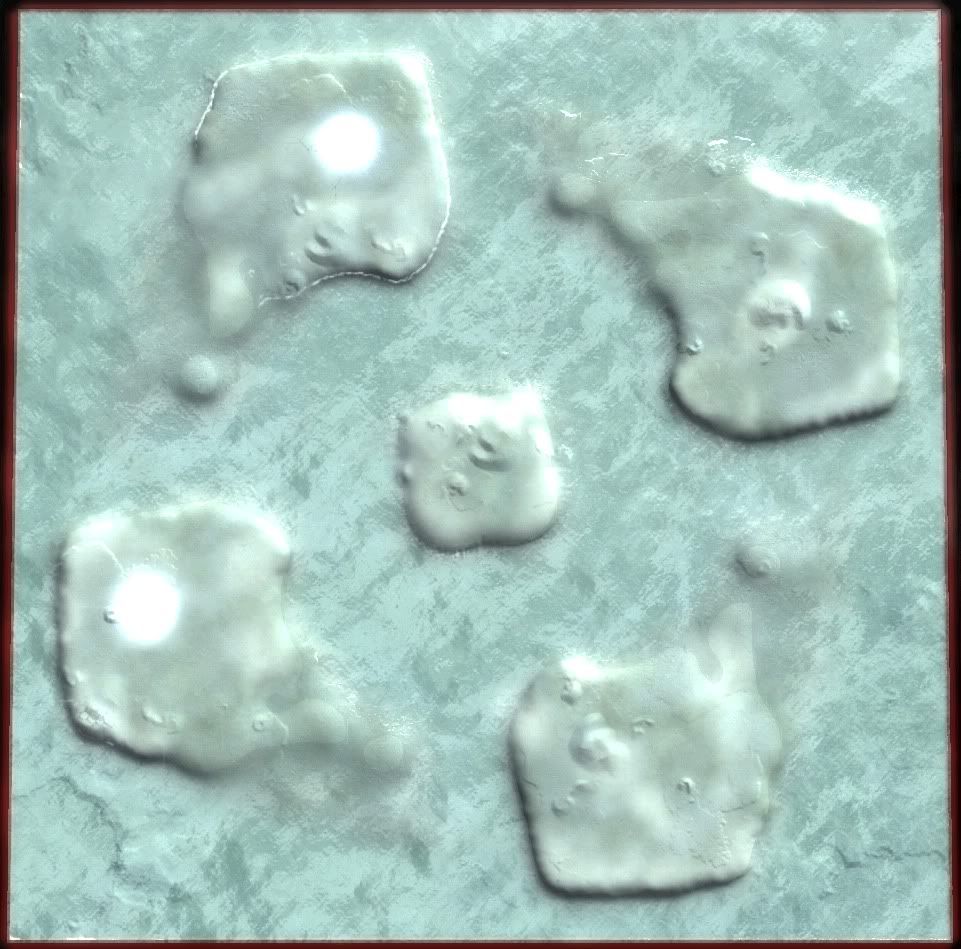
Islands are big enough for large bases but small enough that Tech 2 navy will be effective and Tech 3 navy devastating. Hover units will be very useful for keeping the pressure on your opponents but may not be enough to deliver the knock-out punch.
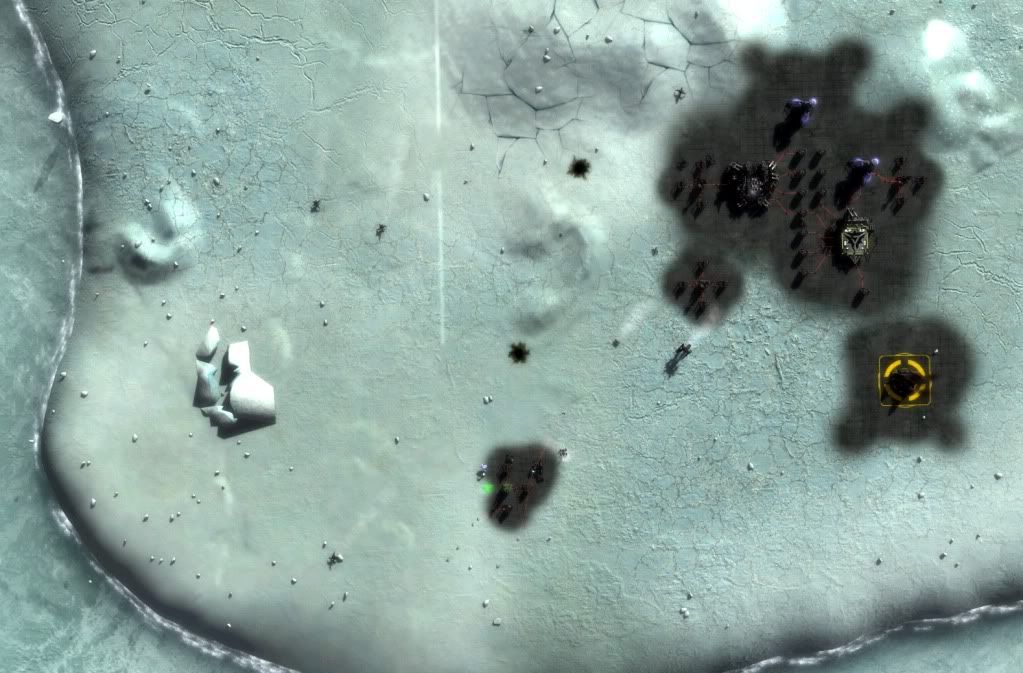
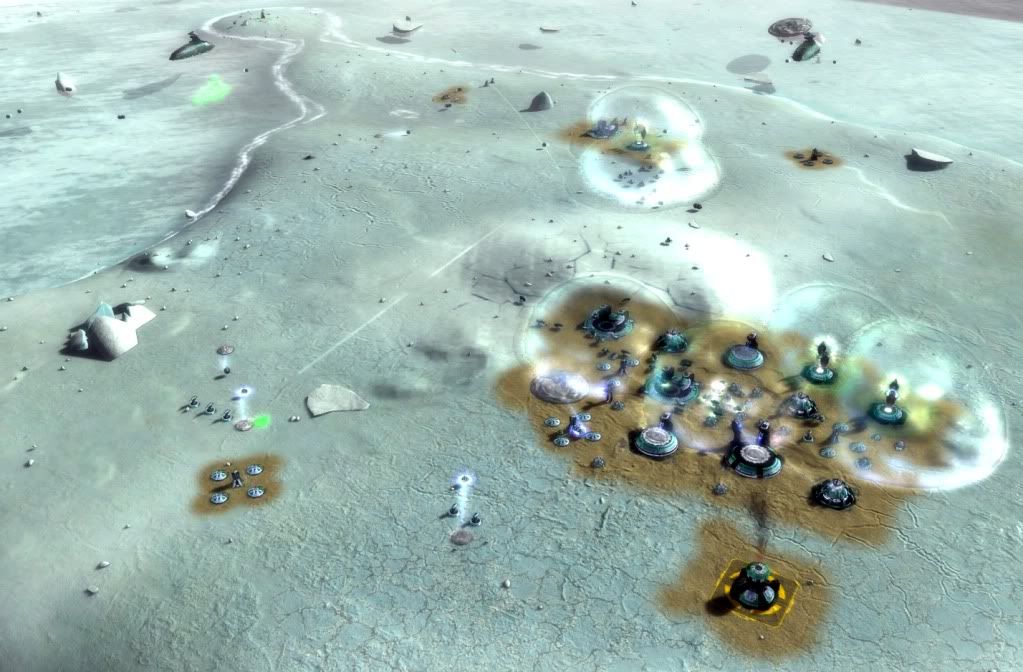
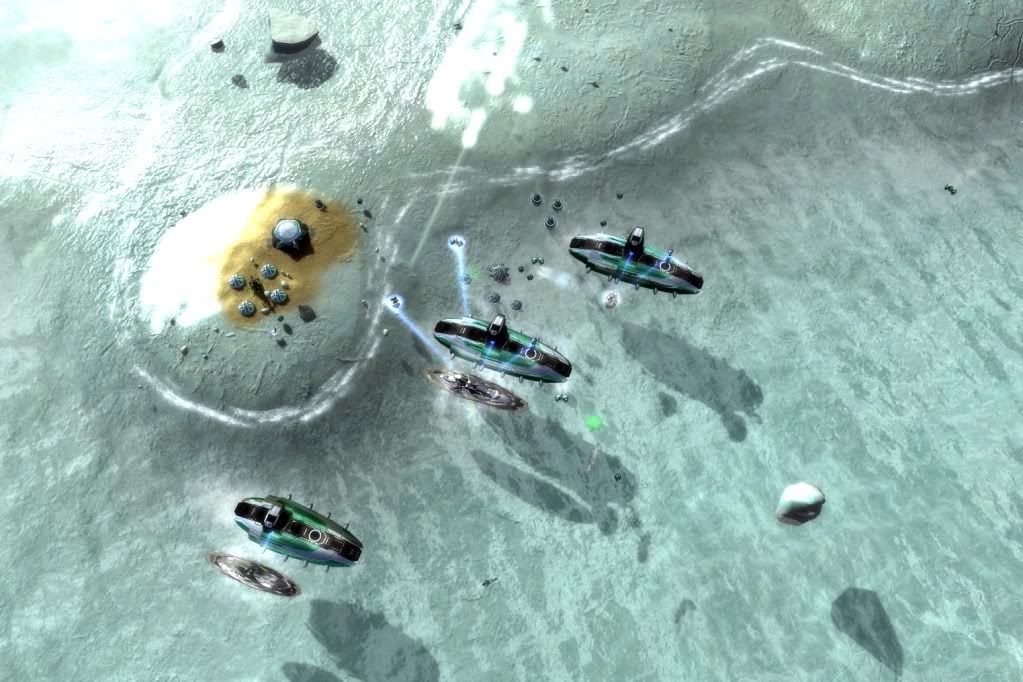
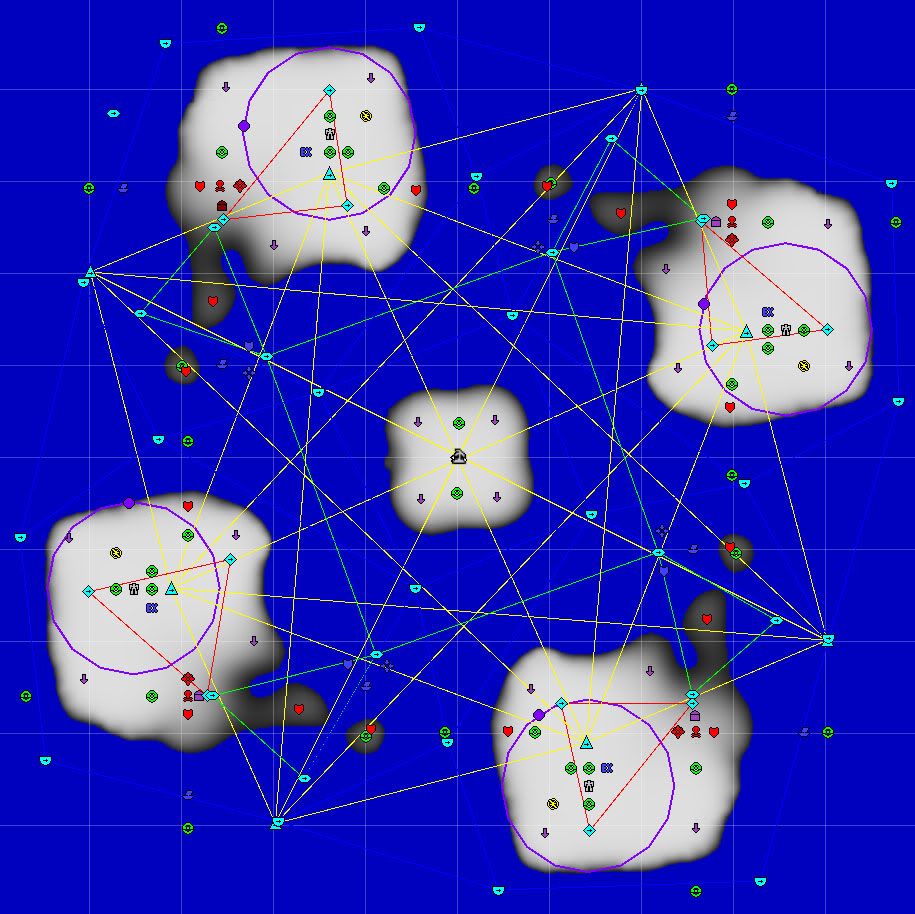
Phrost is available in the Vault and at filefront.
http://www.filefront.com/17787659/Phrost.v0001.zip|||Looks pretty sweet. Looking forward to trying it out.|||I wish there was a drool face on these forums.
Phrost
4 Player 10km square map. Full AI support included. Should be great for 2v2 naval battles with drops or ffa with higher tech levels. Patch 3603 is recommended to encourage strategies other than Tech 3 air.
Islands are big enough for large bases but small enough that Tech 2 navy will be effective and Tech 3 navy devastating. Hover units will be very useful for keeping the pressure on your opponents but may not be enough to deliver the knock-out punch.
Phrost is available in the Vault and at filefront.
http://www.filefront.com/17787659/Phrost.v0001.zip|||Looks pretty sweet. Looking forward to trying it out.|||I wish there was a drool face on these forums.
[WIP] ThornbayFA map for TeamPlay
[:1]Map Name : ThornbayFA
Size: : 20 x 10
# of Players : 4
Hi guys,
This is a map made for hopefully fast TeamPlay games.
My aim is to create maps that run well for 2x2 with human teams and also for 2humans verses 2AIX Sorian AIs. The AI will build shipyards for an excellent naval and air battle to control the waters of Thornbay.
I try to keep the map simple and small enough to run a 1500unit limit without a major slowdown at 1hour when playing against a strong AI.
I managed to get the preview working in FA vault…what a nightmare!
Some questions.
1. I did not set a no-rush radius. Is this really needed?
2. I did not include a readme file. Where do you put the readme file?
3. I added some FA markers, but not all of them. Would the FA waypoint markers improve the AI performance? Sorian AIX seems to run fine on it as it is without waypoints for navy or air.
Please give feedback on improvements that I could make. I will include another start position on each side for 3x3 in the next version.
Thanks
AwarE|||screenshots plz...||| |||I believe that if you don't set a no-rush radius then it will default to 0 and no one will be able to do anything for the duration of the no-rush.
Also, I like the asymmetrical design.|||The map appears to work fine for me with commanders able to build immediately from the start. I guess that is because I have “No-Rush” option set to OFF.
Yes I tested the map with “No-Rush” set to 5 and it caused commanders to not be able to move or build.
Thanks X-Cubed, I will set a no-rush radius at say 50 in the next version so that people that use no-rush can play the map properly.|||I am pleased to report, after play testing the map in multiplayer at GPG, that the map runs Sorian Adaptive AI very well. The Aeon AIs both build shipyards and produce T3 Omen Class battleships and Torrent Class missile ships, as well as a good range of other ships. Both AI also build Viriplacas(Donuts) and GCs experimentals.
A nice nuke exchange took place and both AIs built Emissaries(LRC) and one AI built a T4 Salvation cannon, making an interesting epic battle that took 2hours to complete. AI air attacks were fierce and well targeted, particularly early in the game. The AI bases were well defended.
In TeamPlay we consider a 100 structural losses to be “1 bleat”
Our human team suffered 6 bleats(600 structural losses), so the AI has teeth.
The human team had 4000+ kills and the AI team had 1600 kills.
The AIs built 18 experimentals.
There are some things I will improve in the next version… ‘ThornbayFAv2’
I need to clean up some jagged edges here and there in the height map... underwater.
3 props are in the wrong position… rocks floating on the water.
The AI complains that there are no FA markers.
The game slows down after about 1hr30mins when players have about 800 units each.
Size: : 20 x 10
# of Players : 4
Hi guys,
This is a map made for hopefully fast TeamPlay games.
My aim is to create maps that run well for 2x2 with human teams and also for 2humans verses 2AIX Sorian AIs. The AI will build shipyards for an excellent naval and air battle to control the waters of Thornbay.
I try to keep the map simple and small enough to run a 1500unit limit without a major slowdown at 1hour when playing against a strong AI.
I managed to get the preview working in FA vault…what a nightmare!
Some questions.
1. I did not set a no-rush radius. Is this really needed?
2. I did not include a readme file. Where do you put the readme file?
3. I added some FA markers, but not all of them. Would the FA waypoint markers improve the AI performance? Sorian AIX seems to run fine on it as it is without waypoints for navy or air.
Please give feedback on improvements that I could make. I will include another start position on each side for 3x3 in the next version.
Thanks
AwarE|||screenshots plz...|||
|||I believe that if you don't set a no-rush radius then it will default to 0 and no one will be able to do anything for the duration of the no-rush.Also, I like the asymmetrical design.|||The map appears to work fine for me with commanders able to build immediately from the start. I guess that is because I have “No-Rush” option set to OFF.
Yes I tested the map with “No-Rush” set to 5 and it caused commanders to not be able to move or build.
Thanks X-Cubed, I will set a no-rush radius at say 50 in the next version so that people that use no-rush can play the map properly.|||I am pleased to report, after play testing the map in multiplayer at GPG, that the map runs Sorian Adaptive AI very well. The Aeon AIs both build shipyards and produce T3 Omen Class battleships and Torrent Class missile ships, as well as a good range of other ships. Both AI also build Viriplacas(Donuts) and GCs experimentals.
A nice nuke exchange took place and both AIs built Emissaries(LRC) and one AI built a T4 Salvation cannon, making an interesting epic battle that took 2hours to complete. AI air attacks were fierce and well targeted, particularly early in the game. The AI bases were well defended.
In TeamPlay we consider a 100 structural losses to be “1 bleat”
Our human team suffered 6 bleats(600 structural losses), so the AI has teeth.
The human team had 4000+ kills and the AI team had 1600 kills.
The AIs built 18 experimentals.
There are some things I will improve in the next version… ‘ThornbayFAv2’
I need to clean up some jagged edges here and there in the height map... underwater.
3 props are in the wrong position… rocks floating on the water.
The AI complains that there are no FA markers.
The game slows down after about 1hr30mins when players have about 800 units each.
[REL] Gauntlet 3x3
[:1]Map Name: Gauntlet 3x3
Size : 20x10
Players : 6
Download : FA vault
A plain and simple map for a fast 3x3 with FA markers. (1000+ units)
This map can be played with 3human verses 3human, or 3human verses the AI. It runs the AIX Sorian AI too well, you will need a very good team to conquer the AI here. So far our team has not been able to run the Gauntlet and survive.
Its strange how the FA T3 and T4 LRCs can hit a target even though it is shielded and protected behind a cliff face. I wish I had made the cliffs high enough to provide more protection. I did not want the cliffs to be so high that they stalled aircraft.
Have fun...
edit: Title change to [REL]
 |||The general ground height on this map is 64(default) and the top of the ridge is 77, giving a relative height of 13. I increased the ridge to 85 giving a relative height of 21 and that still did not provide any protection from LRCs. It wasn’t until I set it at 109(45rel) that buildings finally get protection if built close up to the cliff face. I have also added more ridges across the map for base protection. Turtlers will like the change.
I am play-testing the changes tonight in the hope that the AIX will now be possible to defeat.|||Map Name: Gauntlet 3x3FA
Size : 20 x 10
Players : 6
Download : FA Vault
We played the map a couple of times and found that against 2 Sorian AI it is easy to beat. Although against 1 Sorian Turtle AIX that starts in the middle position it is still very difficult. So I guess that is fair enough and I will make this Turtle version available.
The map runs very fast against non-AIX AI. You will see a slowdown at about 1hr30mins against AIX once it has 1000 units.

Size : 20x10
Players : 6
Download : FA vault
A plain and simple map for a fast 3x3 with FA markers. (1000+ units)
This map can be played with 3human verses 3human, or 3human verses the AI. It runs the AIX Sorian AI too well, you will need a very good team to conquer the AI here. So far our team has not been able to run the Gauntlet and survive.
Its strange how the FA T3 and T4 LRCs can hit a target even though it is shielded and protected behind a cliff face. I wish I had made the cliffs high enough to provide more protection. I did not want the cliffs to be so high that they stalled aircraft.
Have fun...
edit: Title change to [REL]
|||The general ground height on this map is 64(default) and the top of the ridge is 77, giving a relative height of 13. I increased the ridge to 85 giving a relative height of 21 and that still did not provide any protection from LRCs. It wasn’t until I set it at 109(45rel) that buildings finally get protection if built close up to the cliff face. I have also added more ridges across the map for base protection. Turtlers will like the change.I am play-testing the changes tonight in the hope that the AIX will now be possible to defeat.|||Map Name: Gauntlet 3x3FA
Size : 20 x 10
Players : 6
Download : FA Vault
We played the map a couple of times and found that against 2 Sorian AI it is easy to beat. Although against 1 Sorian Turtle AIX that starts in the middle position it is still very difficult. So I guess that is fair enough and I will make this Turtle version available.
The map runs very fast against non-AIX AI. You will see a slowdown at about 1hr30mins against AIX once it has 1000 units.
80km x 80km maps ?
[:1]Anyone know of a map pack that only has these sized maps or more 80 x 80 maps ?
The only map that I have of this size is Betrayal Ocean|||I dont think any more of those maps that size really exist X-x
If you want more larger maps, dont look for Map packs. They are few in number as it is. Go download each map individually.
The only map that I have of this size is Betrayal Ocean|||I dont think any more of those maps that size really exist X-x
If you want more larger maps, dont look for Map packs. They are few in number as it is. Go download each map individually.
[SC2] how adding mass points to a map?
[:1]Well, like the title says, I would like to know how to add mass points to a map.
I can't find it so if you know how to do this please leave a comment.|||Start on page 1 in this forum... Read every topic, it will take a week if you spend like one hour every evening. After that you will find threads about "FAME" with other extreme useful posts and you will also master the save.lua file which is the key of modding the mass spots in SC2 maps.
good luck :)|||Thanks for your comment
I already found the save.lua file, but didn't understand what to do whit it
I can't find it so if you know how to do this please leave a comment.|||Start on page 1 in this forum... Read every topic, it will take a week if you spend like one hour every evening. After that you will find threads about "FAME" with other extreme useful posts and you will also master the save.lua file which is the key of modding the mass spots in SC2 maps.
good luck :)|||Thanks for your comment
I already found the save.lua file, but didn't understand what to do whit it
(Red-FA) 5 Player Survival?
[:1]Ello, I had a idea from a friend, and I was wondering, if anyone would be able to make a 5-player survival map? I noticed all of the good ones were built for 4 players, and I need one with 5 players =o
I know the Thermopylae (I Think thats what it is called) is a good survival, but theres no real objective then just "Hold the line". I would like something, that is like "5iver Survival Land Naval", but instead of 4 players, its made for 5.
Can anyone do this? ^^|||Nobody eh? Is it seriously that hard?|||If you want something done you will probably have to do it yourself.|||electro2|||my current project is a 5 player survival map.

been working on it on and off during the past year, still a lot of work to be done.|||Ghaleon
I know the Thermopylae (I Think thats what it is called) is a good survival, but theres no real objective then just "Hold the line". I would like something, that is like "5iver Survival Land Naval", but instead of 4 players, its made for 5.
Can anyone do this? ^^|||Nobody eh? Is it seriously that hard?|||If you want something done you will probably have to do it yourself.|||electro2|||my current project is a 5 player survival map.
been working on it on and off during the past year, still a lot of work to be done.|||Ghaleon
Map Resizing ?
[:1]I tried resizing a map from 40x40 to 80x80 but when I did that all the positions and markers were off.
Anyway of doing this so that everything gets resized properly ?|||Can't be done.
Instead, it's much easier to make tanks and buildings smaller. I made this a few years ago; http://code.google.com/p/healthandmana/ ... mander.zip|||hmm... So, if I want to resize a map, I would have to make a merge file for every unit AND structure in the game, and make them bigger/smaller? I'd also have to edit their speed, muzzle velocity and acceleration accordingly, and resize mex spots... Holy ******* ****. No thanks. Can I plz just use map size*0.5 and be done with it? =(|||Shove my mod into Blueprints.lua and it should work.|||BulletMagnet|||Yes, yes, yes.
Also, it wasn't perfect because I couldn't work out how to shrink certain effects. It's going to need some changes for pathing too.|||BulletMagnet|||Can't tell you any more than pathing will need to be looked at - I never got around to poking with it.|||well, what symptoms are there? Do they look game breaking, or more like just a bit glitchy a la unit gets stuck in building on rare occasion?|||Also, maybe im stupid, but in the map scenario file, it says its "size = 1024 x 1024", would editing that change the model size? Just like unitsize can be edited very easily?|||Nephylim
Anyway of doing this so that everything gets resized properly ?|||Can't be done.
Instead, it's much easier to make tanks and buildings smaller. I made this a few years ago; http://code.google.com/p/healthandmana/ ... mander.zip|||hmm... So, if I want to resize a map, I would have to make a merge file for every unit AND structure in the game, and make them bigger/smaller? I'd also have to edit their speed, muzzle velocity and acceleration accordingly, and resize mex spots... Holy ******* ****. No thanks. Can I plz just use map size*0.5 and be done with it? =(|||Shove my mod into Blueprints.lua and it should work.|||BulletMagnet|||Yes, yes, yes.
Also, it wasn't perfect because I couldn't work out how to shrink certain effects. It's going to need some changes for pathing too.|||BulletMagnet|||Can't tell you any more than pathing will need to be looked at - I never got around to poking with it.|||well, what symptoms are there? Do they look game breaking, or more like just a bit glitchy a la unit gets stuck in building on rare occasion?|||Also, maybe im stupid, but in the map scenario file, it says its "size = 1024 x 1024", would editing that change the model size? Just like unitsize can be edited very easily?|||Nephylim
[REL][SC2][MOD MAP]Treallach Jungle v2
[:1]Welcome to the Treallach Jungle - a modified skirmish/MP map for supreme commander 2.

Please read the below information about the map in order to maximize your little bit different supreme commander 2 experience...
1. How to install and play the map:
-----------------------------------
Download the "treallachjungle1.zip" (link below) extract it and put "treallachjunglev1.scd into your supreme commander 2 gamedata folder.
Create a skirmish game or host a multiplayer game and choose the map. The map will show up as a extra "Setons clutch". If you have installed the map correct you will see this screen;

What ever you want to play (1v1, 2v2, 4v1, FFA, etc...) you need to put any AI:normal at position 8 (the middle lower position). Else the jungle will not show up!
This is not a ordinary mod. This is a mod map and that means that this map will NOT break MP rank matches or other multiplayer matches. It will not break the campaign or any save files and will probably be still working after the next patch. - Just be 100% sure that all players got the exact same version of the game. So there are absolutely no reason not to download this map and try out!
You will need the DLC in order to play this map, but as cheap as it is for the moment I guess you got it already anyway...
2. Map features and main philosophy;
-------------------------------------
Treallach Jungle is my little test project there I have been playing around with the codes from the supreme commander 2 files. The goal has been to create a different map there different starting positions and factions will force you to play the map different. It looks like a mirrored map, but its not and will never be.
Main changes from the map Treallach Island;
-No mass spots; In order to get mass you need to reclaim the jungle tree. In order to reclaim the jungle tree to need to put your engineer or commander on patrol. The trees wil not grow back so when the last tree is reclaimed or destroyed (yes the trees are very fragile) its high time to research mass conversion!
-Capture stuff; Normal supreme commander 2 maps are plain and empty. Treallach Island got not only trees but also secrets and unknown objects. in order to make the battle slightly more favorable for you its better to reclaiming or capture these things on the hills before your enemy!
-Dynamic world and destructable environment; Sounds too good to be true, and well it is, but the jungle of Treallach is not only mass. Units bigger than bots will have their speed slowed down to 50% and all units will be more or less hidden from the radar as long as they are near a tree! So what to do if you cant catch your enemy bots? Go artillery or major experimental (they are destroying the trees by walking) and destroy the jungle and blow out their hide outs!
3. Presentation of map objects;
-------------------------------
3.1 Old artillery Station;

For a long time ago there were huge plans for this island. It was the perfect place to defend the rest of the Treallach coast and the work begun with transforming the island to a fort. The only thing that still are intact today is this huge artillery station. Slow and outdated, but free fire power is good fire power...
3.2 Advanced communication center;

Scientists from all factions have done expeditions to this Island several times. All with limited success. The main reason was the hostile jungle environment. One expedition set up a huge advanced communication center on a hill. The center scans all frequencies and are able to present a very clear picture of the Island. The expedition met a tragic end but the communication center is still functional!
3.3 Treallach meteors;

The toxic level of sulfur would killed any commander outside the ACU. The toxic gas comes from the meteors of the north hill. You have two options; Report the location to the scientist or reclaim the huge rocks and build up your army with the exotic minerals and metals you can find inside. I know what your enemy will choose if he arrives first...
3.4 Trellasaurus

You can feel it -Somewhere inside the deep jungle there are ancient monsters searching for preys. in order to be the supreme commander of this forsaken jungle island you need to find these monsters and kill them to gain knowledge, experience and fame or maybe you can ally yourself with the Island habitants?
4. Issues;
-All players need the same version of the map installed in order to play the map.
-All players playing the map needs the DLC enabled.
-The "slowdown" in the jungle looks "laggy" and that because my limited knowledge.
-Some jungle trees are stuck and will not be reclaimed or destroyed. This is also due to my limited knowledge.
-Do not kill the AI commander in the top left corner. The game will crash.
-Because of this commander issue there will never be any "winner", then its only one player left -Use the ctrl+k to end the game.
-The map is heavily play tested, if you feel the map is unbalanced, its probably because you play the map as a normal supcom2 map. This map is very micro intense and you need to be aware that your normal research path might not be the most efficient on this map.
Anyway, this map is for fun and I will update it by request. Send me a replay or just a comment here or by email at fransotto@hotmail.com.
Find the map here: "treallachjunglev1"
http://www.obliteratingwave.co.uk/Supreme_Commander_2/Maps/
Good luck commander!|||Me, Pulse and Cygnus play-tested this map. We do have a few things to note.
- the dinos need to be spread out (having them all on the mesa means whoever gets to it first gets all of them)
- the arty installation is useless as is... if you were to make it more powerful it would make it worth capturing
- the intel station is fine
- because there are no mass spots whatsoever, it encourages the use of mass conversion, maybe putting a few initial mass spots at the spawn points would encourage other strategies|||Perhaps a few mass points in the middle of the jungle to promote aggressive play?|||X-Cubed|||-The-Baron-|||Finally! Had some huge problem with steam.
Anyway, version 2 uploading now!
-More valuable jungle now one engineer can by reclaiming jungle almost support one factory.
-Less jungle tree been able to use a supcom1 editor to put down the trees. The jungle looks better and not so many floating or "stuck" trees anymore. :)
-Stronger artillery, easier to capture.
-Meteor stones easier to reclaim.
-Trellasaurus nerfed and four of them are on the "ground level". Harder to capture.
-Position 7 will start with two meteor stones if you want to play 4v1 or something.
Pictures;

By fransotto at 2011-01-13

By fransotto at 2011-01-13

By fransotto at 2011-01-13
Have fun!
PS. Please remove version 1 of the map before play.|||download link doesn't work|||colacan|||Alternative link;
http://infectedharvog.com/wp-content/supcom2%20mods/
Have fun! :)
Please read the below information about the map in order to maximize your little bit different supreme commander 2 experience...
1. How to install and play the map:
-----------------------------------
Download the "treallachjungle1.zip" (link below) extract it and put "treallachjunglev1.scd into your supreme commander 2 gamedata folder.
Create a skirmish game or host a multiplayer game and choose the map. The map will show up as a extra "Setons clutch". If you have installed the map correct you will see this screen;
What ever you want to play (1v1, 2v2, 4v1, FFA, etc...) you need to put any AI:normal at position 8 (the middle lower position). Else the jungle will not show up!
This is not a ordinary mod. This is a mod map and that means that this map will NOT break MP rank matches or other multiplayer matches. It will not break the campaign or any save files and will probably be still working after the next patch. - Just be 100% sure that all players got the exact same version of the game. So there are absolutely no reason not to download this map and try out!
You will need the DLC in order to play this map, but as cheap as it is for the moment I guess you got it already anyway...
2. Map features and main philosophy;
-------------------------------------
Treallach Jungle is my little test project there I have been playing around with the codes from the supreme commander 2 files. The goal has been to create a different map there different starting positions and factions will force you to play the map different. It looks like a mirrored map, but its not and will never be.
Main changes from the map Treallach Island;
-No mass spots; In order to get mass you need to reclaim the jungle tree. In order to reclaim the jungle tree to need to put your engineer or commander on patrol. The trees wil not grow back so when the last tree is reclaimed or destroyed (yes the trees are very fragile) its high time to research mass conversion!
-Capture stuff; Normal supreme commander 2 maps are plain and empty. Treallach Island got not only trees but also secrets and unknown objects. in order to make the battle slightly more favorable for you its better to reclaiming or capture these things on the hills before your enemy!
-Dynamic world and destructable environment; Sounds too good to be true, and well it is, but the jungle of Treallach is not only mass. Units bigger than bots will have their speed slowed down to 50% and all units will be more or less hidden from the radar as long as they are near a tree! So what to do if you cant catch your enemy bots? Go artillery or major experimental (they are destroying the trees by walking) and destroy the jungle and blow out their hide outs!
3. Presentation of map objects;
-------------------------------
3.1 Old artillery Station;
For a long time ago there were huge plans for this island. It was the perfect place to defend the rest of the Treallach coast and the work begun with transforming the island to a fort. The only thing that still are intact today is this huge artillery station. Slow and outdated, but free fire power is good fire power...
3.2 Advanced communication center;
Scientists from all factions have done expeditions to this Island several times. All with limited success. The main reason was the hostile jungle environment. One expedition set up a huge advanced communication center on a hill. The center scans all frequencies and are able to present a very clear picture of the Island. The expedition met a tragic end but the communication center is still functional!
3.3 Treallach meteors;
The toxic level of sulfur would killed any commander outside the ACU. The toxic gas comes from the meteors of the north hill. You have two options; Report the location to the scientist or reclaim the huge rocks and build up your army with the exotic minerals and metals you can find inside. I know what your enemy will choose if he arrives first...
3.4 Trellasaurus
You can feel it -Somewhere inside the deep jungle there are ancient monsters searching for preys. in order to be the supreme commander of this forsaken jungle island you need to find these monsters and kill them to gain knowledge, experience and fame or maybe you can ally yourself with the Island habitants?
4. Issues;
-All players need the same version of the map installed in order to play the map.
-All players playing the map needs the DLC enabled.
-The "slowdown" in the jungle looks "laggy" and that because my limited knowledge.
-Some jungle trees are stuck and will not be reclaimed or destroyed. This is also due to my limited knowledge.
-Do not kill the AI commander in the top left corner. The game will crash.
-Because of this commander issue there will never be any "winner", then its only one player left -Use the ctrl+k to end the game.
-The map is heavily play tested, if you feel the map is unbalanced, its probably because you play the map as a normal supcom2 map. This map is very micro intense and you need to be aware that your normal research path might not be the most efficient on this map.
Anyway, this map is for fun and I will update it by request. Send me a replay or just a comment here or by email at fransotto@hotmail.com.
Find the map here: "treallachjunglev1"
http://www.obliteratingwave.co.uk/Supreme_Commander_2/Maps/
Good luck commander!
|||Me, Pulse and Cygnus play-tested this map. We do have a few things to note.- the dinos need to be spread out (having them all on the mesa means whoever gets to it first gets all of them)
- the arty installation is useless as is... if you were to make it more powerful it would make it worth capturing
- the intel station is fine
- because there are no mass spots whatsoever, it encourages the use of mass conversion, maybe putting a few initial mass spots at the spawn points would encourage other strategies|||Perhaps a few mass points in the middle of the jungle to promote aggressive play?|||X-Cubed|||-The-Baron-|||Finally! Had some huge problem with steam.
Anyway, version 2 uploading now!
-More valuable jungle now one engineer can by reclaiming jungle almost support one factory.
-Less jungle tree been able to use a supcom1 editor to put down the trees. The jungle looks better and not so many floating or "stuck" trees anymore. :)
-Stronger artillery, easier to capture.
-Meteor stones easier to reclaim.
-Trellasaurus nerfed and four of them are on the "ground level". Harder to capture.
-Position 7 will start with two meteor stones if you want to play 4v1 or something.
Pictures;
By fransotto at 2011-01-13
By fransotto at 2011-01-13
By fransotto at 2011-01-13
Have fun!
PS. Please remove version 1 of the map before play.|||download link doesn't work
|||colacan|||Alternative link;http://infectedharvog.com/wp-content/supcom2%20mods/
Have fun! :)
Trouble with SC Map Editor
[:1]hi,
I just downloaded the SupCom Map Editor from the Vault. The problem comes, when I try to create a new scenario. At this point the editor consistently crashes. A Supreme Commander error sending notice comes up asking me if i want to send a report. So, I'm wondering if anyone has knowledge on how to get pass this issue. Thanks.|||Make sure you have "Supcom Map Editor" in the correct folder....
C:\Program Files\THQ\Gas Powered Games\Supreme Commander\bin
Note: SupCom not FA
I just downloaded the SupCom Map Editor from the Vault. The problem comes, when I try to create a new scenario. At this point the editor consistently crashes. A Supreme Commander error sending notice comes up asking me if i want to send a report. So, I'm wondering if anyone has knowledge on how to get pass this issue. Thanks.|||Make sure you have "Supcom Map Editor" in the correct folder....
C:\Program Files\THQ\Gas Powered Games\Supreme Commander\bin
Note: SupCom not FA
[REL] Stealth Ports
[:1]Map Name : Stealth Ports
Size : 20 x 10 [15k]
Players : 6 [3x3]
Download : FA Vault
This map is for those who seek a major Naval battle.
Can be played in any combination up to 3x3… (1x3, 3x1, 2x1, 2x2, 2x3, 3x2)
Sorian Water AI runs well and will build T3 ships and attack with them for a medium difficulty game,
Sorian Water AIX will provide a very hard difficulty game.
FA markers are included.
Good base and resource protection for nuke and LRC battles. This map is not a good air map due to the extreme high walls.
There are many elevation levels on this map that require ramps to climb and descend. The right side has 8 ramps for experimentals, plus 4 for just units. The left side has 9 ramps for experimentals and 4 for units.
Total ramps = 25
It is a complicated landscape that will require some learning.
Recommended max 1000 unit limit.

Size : 20 x 10 [15k]
Players : 6 [3x3]
Download : FA Vault
This map is for those who seek a major Naval battle.
Can be played in any combination up to 3x3… (1x3, 3x1, 2x1, 2x2, 2x3, 3x2)
Sorian Water AI runs well and will build T3 ships and attack with them for a medium difficulty game,
Sorian Water AIX will provide a very hard difficulty game.
FA markers are included.
Good base and resource protection for nuke and LRC battles. This map is not a good air map due to the extreme high walls.
There are many elevation levels on this map that require ramps to climb and descend. The right side has 8 ramps for experimentals, plus 4 for just units. The left side has 9 ramps for experimentals and 4 for units.
Total ramps = 25
It is a complicated landscape that will require some learning.
Recommended max 1000 unit limit.
map maker wanted
[:1]Hi Guys
Would one of you guys be kind enough to make a map for me.
I would love a 20 km map with AI in each corner with plenty of mass in each corner. Doesnt have to be a flash map with countours and water etc, just a plain map so I can go me against 3 AI with plenty of mass so I can play for a couple of hours and bomb the heck out of everything. Would help if there was only one way the land units could get into each base so I could put some real heavy defences on the in route.
The usual maps, are good, but most of the 20 km maps have the ai in the middle. then ones that dot have water and that really screws up the game speed.
Thanks trev|||Hi,
The 20 x 10 [15k] maps that I make will run much better than a 20 x 20 against the AI. Try ‘Open War FA’ or ‘Gauntlet 3x3 FA’ against 3 AIX Sorian Turtles and see how you go.
There is plenty of mass on these maps and you are well defended by the landform.
It is not easy to put the AI start position right in the corner of any map because the AI will not initiate if it is too close to the edge.
Would one of you guys be kind enough to make a map for me.
I would love a 20 km map with AI in each corner with plenty of mass in each corner. Doesnt have to be a flash map with countours and water etc, just a plain map so I can go me against 3 AI with plenty of mass so I can play for a couple of hours and bomb the heck out of everything. Would help if there was only one way the land units could get into each base so I could put some real heavy defences on the in route.
The usual maps, are good, but most of the 20 km maps have the ai in the middle. then ones that dot have water and that really screws up the game speed.
Thanks trev|||Hi,
The 20 x 10 [15k] maps that I make will run much better than a 20 x 20 against the AI. Try ‘Open War FA’ or ‘Gauntlet 3x3 FA’ against 3 AIX Sorian Turtles and see how you go.
There is plenty of mass on these maps and you are well defended by the landform.
It is not easy to put the AI start position right in the corner of any map because the AI will not initiate if it is too close to the edge.
[REL] Open War and Open War FA
[:1]Map Name: Open War (in FA vault its called Open War FA)
Size : 20 x 10
Players : 6
Download : SupCom Vault and FA Vault
This map can be played 3human v 3human or 3human v 3AI as TeamPlay.
The Battle takes place in the vicinity of the Crystal Dog Star.
Please don’t think I have given up on the fast 3x3 Teamplay map. Although, I have had a bit of fun expressing creative flair on this map, it should still be fast.
The only real problem I have with the map editor is that when I add all FA markers the map errors and becomes unusable. The Sorian AI seems smart enough to overcome the lack of some markers. I am trying to eliminate which FA maker is causing the problem, I think it could be ‘Water Link Marker’. I hope its not the 'Waypoint Markers' because I need them on other maps with more complicated path-finding.
 |||I've done considerable map editing and had exactly the same issues. What I do know is that it's much easier to place and move markers using Hazards' Marker Editor than it is to use the SC Map Editor - and it's reliable.
From time to time, the Map Editor will corrupt the _save file (where markers are stored). It's almost always a Naval Area marker that gets corrupted (extra characters are inserted making it unreadable).|||Thanks Sprouto, your mention of the _save file allowed me to fix and load some maps that were corrupted. I still don’t know which marker is causing the problem, although I agree it is to do with the FA water markers.
I use Hazards' Marker Editor and find it excellent.|||This map has FA markers included.
Size : 20 x 10
Players : 6
Download : SupCom Vault and FA Vault
This map can be played 3human v 3human or 3human v 3AI as TeamPlay.
The Battle takes place in the vicinity of the Crystal Dog Star.
Please don’t think I have given up on the fast 3x3 Teamplay map. Although, I have had a bit of fun expressing creative flair on this map, it should still be fast.
The only real problem I have with the map editor is that when I add all FA markers the map errors and becomes unusable. The Sorian AI seems smart enough to overcome the lack of some markers. I am trying to eliminate which FA maker is causing the problem, I think it could be ‘Water Link Marker’. I hope its not the 'Waypoint Markers' because I need them on other maps with more complicated path-finding.
|||I've done considerable map editing and had exactly the same issues. What I do know is that it's much easier to place and move markers using Hazards' Marker Editor than it is to use the SC Map Editor - and it's reliable. From time to time, the Map Editor will corrupt the _save file (where markers are stored). It's almost always a Naval Area marker that gets corrupted (extra characters are inserted making it unreadable).|||Thanks Sprouto, your mention of the _save file allowed me to fix and load some maps that were corrupted. I still don’t know which marker is causing the problem, although I agree it is to do with the FA water markers.
I use Hazards' Marker Editor and find it excellent.|||This map has FA markers included.
[REL] Dark Gate
[:1]Name : Dark Gate
Size : 20 x 10 [15k]
Players : 6 [3x3]
Download : FA Vault
The Dark Gate was built by Seraphim as a permenant means of teleporting the Ythotha onto the planet. Once the other factions were aware of its capabilities they guarded the gate and destroyed the Ythotha as it arrived. They then retreated as the Othuy [Unidentified Residual Energy Signature] crippled the gate in less than 30 seconds.
Now all factions are seeking to repair and control the Dark Gate to use it for the own purposes.
3x3 with FA markers
Note: World Border must be turned OFF, otherwise some parts of the map will appear black.

good hunting
Size : 20 x 10 [15k]
Players : 6 [3x3]
Download : FA Vault
The Dark Gate was built by Seraphim as a permenant means of teleporting the Ythotha onto the planet. Once the other factions were aware of its capabilities they guarded the gate and destroyed the Ythotha as it arrived. They then retreated as the Othuy [Unidentified Residual Energy Signature] crippled the gate in less than 30 seconds.
Now all factions are seeking to repair and control the Dark Gate to use it for the own purposes.
3x3 with FA markers
Note: World Border must be turned OFF, otherwise some parts of the map will appear black.
good hunting
Is it possible to add SC2 tileset textures to SC Map Editor?
[:1]All said in the title, Im looking to introduce some variety in the terrains types of the Editor, and I would like to use some of the terrain tilesets of SC2 if possible. But I haven't found the way to do it. I don't know where the editor stores the textures it uses.
Looking for a particular survival map
[:1]There were 4 lanes, one for each player. The usual surviving wave after wave. If the player survived, it would start again, this time with even more powerful versions of the previous units until the player was exterminated. The player that survived the longest out of the 4 won. Anyone know where on earth it is? I have had absolutely no success finding it.|||It's called "Supreme Art of Defence". I remembered it from a while back so had a look in my vault and there it is.|||Thanks very much
Is it at all possible for it to work with FA, or is there a lot that needs redoing for that to work?|||Sorry I don't have a clue. Here's the thread for it: viewtopic.php?f=7&t=13367&start=0
Apparently the author Edmon was last online about 5 weeks ago so he may respond to a pm.|||I wish there was a Manual Download link for that map to XD Vault doesnt work for me, but I'd sure as hell love to try that map XD
Is it at all possible for it to work with FA, or is there a lot that needs redoing for that to work?|||Sorry I don't have a clue. Here's the thread for it: viewtopic.php?f=7&t=13367&start=0
Apparently the author Edmon was last online about 5 weeks ago so he may respond to a pm.|||I wish there was a Manual Download link for that map to XD Vault doesnt work for me, but I'd sure as hell love to try that map XD
[REL] Lake Anguish
[:1]Name : Lake Anguish
Size : 20 x 10 [15k]
Players : 6 [3x3]
Download : FA Vault
The Cybran were first to discover this lake and established a base on the eastern shore to train their naval cadets. When other factions heard of the resource rich central peninsulas they were determined to acquire the lake for themselves. Many Commanders have struggled to wrench this prize from the Cybran and failed.
TeamPlay
1, 2 or 3 Cybran AIX Sorian Water AIs in the East verses 2 or 3 human players in the West.
Resources are evenly placed, so this map is fine for any combination of all human players up to 3v3.
FA markers are included.

Good luck Commander.|||Lake Anguish Map - TeamPlay Difficulty Levels.
Assuming:
2 or 3 co-op humans against co-op AI
Sorian Water AI or AIX is used.
Only one faction is against you.
At least 1000 max units.
Easy
Level 1 – 2 human verses 3 AI
Level 2 – 2 human verses 2 AI
Level 3 – 2 human verses 1 AI
Level 4 – 3 human verses 3 AI
Level 5 – 3 human verses 2 AI
Level 6 – 3 human verses 1 AI
Medium
Level 7 - 2 human verses 2 AI +1AIX
Level 8 – 2 human verses 1 AI +1AIX
Level 9 – 3 human verses 2 AI +1AIX
Level 10 – 3 human verses 1 AI +1AIX
Level 11– 3 human verses 1 AI +2AIX
Hard
Level 12 - 2 human verses 3 AIX
Level 13 - 2 human verses 2 AIX
Level 14 – 2 human verses 1 AIX
Level 15 – 3 human verses 3 AIX
Level 16 – 3 human verses 2 AIX
Level 17 – 3 human verses 1 AIX|||TeamPlay on Lake Anguish
TeamPlay is multiplayer Co-Op human players fighting against Co-Op AI.
There is only one rule and that is:
All allied commanders must be allive at the finish
or you have a hollow victory = loss
TeamPlay does not need to play the same way each time.
TeamPlay can almost be identical, if you set everything up exactly the same as before.
If you want to vary the game play:
You can change the faction of the Co-Op AIs.
You can play a mix of different factions.
You can change the type of Co-Op AI…Air, Land or Water.
You can play a mix of different AI types.
Generally
1./ I find Sorian AI runs the best and of course Sorian AIX is stronger but will slow the game on slow machines.
You could change the AI to some other 3rd party AI to see a different gameplay by the Co-Op AIs.
2./ The more human players sharing the resources the harder the difficulty, unless the map is resource rich.
3./ The fewer the AI, the less factions and the less types of AI the faster it will run.
4./ On some maps 2AIX in the best positions, of the correct type to suit the map and the correct faction or mix of these options will provide the strongest match for elite players.
5./ WinXP 32bit host machine will run a stronger more intelligent AI game than a faster machine on 64bit Win7. Its ok to have win7 players as joiners, as it will still perform well.
6./ You should be able to finish a TeamPlay game without the speed falling below normal [0] if all players have at least core2duo CPUs, on these 20x10 [15k] maps.
roj
Size : 20 x 10 [15k]
Players : 6 [3x3]
Download : FA Vault
The Cybran were first to discover this lake and established a base on the eastern shore to train their naval cadets. When other factions heard of the resource rich central peninsulas they were determined to acquire the lake for themselves. Many Commanders have struggled to wrench this prize from the Cybran and failed.
TeamPlay
1, 2 or 3 Cybran AIX Sorian Water AIs in the East verses 2 or 3 human players in the West.
Resources are evenly placed, so this map is fine for any combination of all human players up to 3v3.
FA markers are included.
Good luck Commander.|||Lake Anguish Map - TeamPlay Difficulty Levels.
Assuming:
2 or 3 co-op humans against co-op AI
Sorian Water AI or AIX is used.
Only one faction is against you.
At least 1000 max units.
Easy
Level 1 – 2 human verses 3 AI
Level 2 – 2 human verses 2 AI
Level 3 – 2 human verses 1 AI
Level 4 – 3 human verses 3 AI
Level 5 – 3 human verses 2 AI
Level 6 – 3 human verses 1 AI
Medium
Level 7 - 2 human verses 2 AI +1AIX
Level 8 – 2 human verses 1 AI +1AIX
Level 9 – 3 human verses 2 AI +1AIX
Level 10 – 3 human verses 1 AI +1AIX
Level 11– 3 human verses 1 AI +2AIX
Hard
Level 12 - 2 human verses 3 AIX
Level 13 - 2 human verses 2 AIX
Level 14 – 2 human verses 1 AIX
Level 15 – 3 human verses 3 AIX
Level 16 – 3 human verses 2 AIX
Level 17 – 3 human verses 1 AIX|||TeamPlay on Lake Anguish
TeamPlay is multiplayer Co-Op human players fighting against Co-Op AI.
There is only one rule and that is:
All allied commanders must be allive at the finish
or you have a hollow victory = loss
TeamPlay does not need to play the same way each time.
TeamPlay can almost be identical, if you set everything up exactly the same as before.
If you want to vary the game play:
You can change the faction of the Co-Op AIs.
You can play a mix of different factions.
You can change the type of Co-Op AI…Air, Land or Water.
You can play a mix of different AI types.
Generally
1./ I find Sorian AI runs the best and of course Sorian AIX is stronger but will slow the game on slow machines.
You could change the AI to some other 3rd party AI to see a different gameplay by the Co-Op AIs.
2./ The more human players sharing the resources the harder the difficulty, unless the map is resource rich.
3./ The fewer the AI, the less factions and the less types of AI the faster it will run.
4./ On some maps 2AIX in the best positions, of the correct type to suit the map and the correct faction or mix of these options will provide the strongest match for elite players.
5./ WinXP 32bit host machine will run a stronger more intelligent AI game than a faster machine on 64bit Win7. Its ok to have win7 players as joiners, as it will still perform well.
6./ You should be able to finish a TeamPlay game without the speed falling below normal [0] if all players have at least core2duo CPUs, on these 20x10 [15k] maps.
roj
[SOLVED] Deep/abyss water
[:1]What's the difference and how does it affect gameplay?
I'd like to create a map with water, but I'm a little confused as to what the different settings are used for. My intial elevation will be 64, as normal, and the water will be 63. The deepest water atm will be 50. AngryZealot's tutorial doesn't cover water, and I can't find much else relating to it.
Halp?
Edit: K, I realised it's only visual. =/
I'd like to create a map with water, but I'm a little confused as to what the different settings are used for. My intial elevation will be 64, as normal, and the water will be 63. The deepest water atm will be 50. AngryZealot's tutorial doesn't cover water, and I can't find much else relating to it.
Halp?
Edit: K, I realised it's only visual. =/
Subscribe to:
Posts (Atom)